In this article
Start with a resolution your PC can use effectively and a format that fits your desk, then consider refresh rate and useful features. Three BGM catalogue models illustrate different compromises: the DARKNESS CURVED for staying at Full HD, the Horizon for moving to QHD on a 27-inch screen, and the Orbit for an ultrawide display. These directions follow published specifications, not a ranking based on BGM testing.
Three models for different needs
The linked listings identify the products. Being listed does not confirm stock or immediate order availability. Confirm the exact model, availability and complete price in dinars before paying.
The three monitors in this comparison
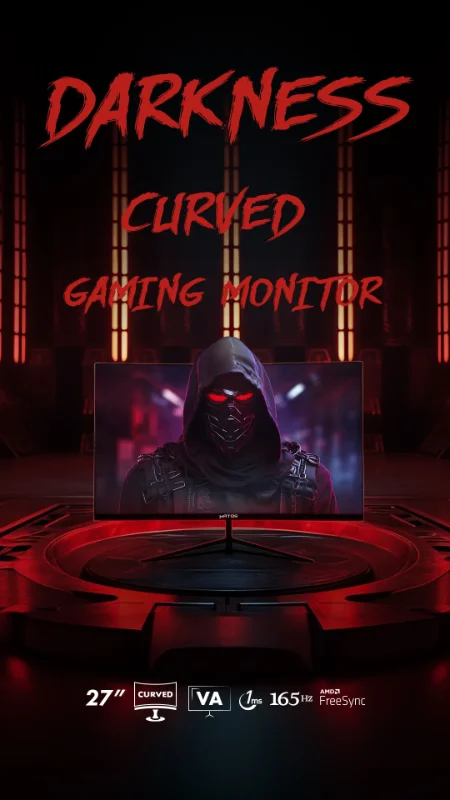
The Matos DARKNESS CURVED, identified as DARKNESS MSG27-C in its description, lists a 27-inch curved VA panel, 1920 × 1080 resolution and 165 Hz. Consider it if keeping Full HD is your priority. That choice does not prove it is more responsive than another monitor.
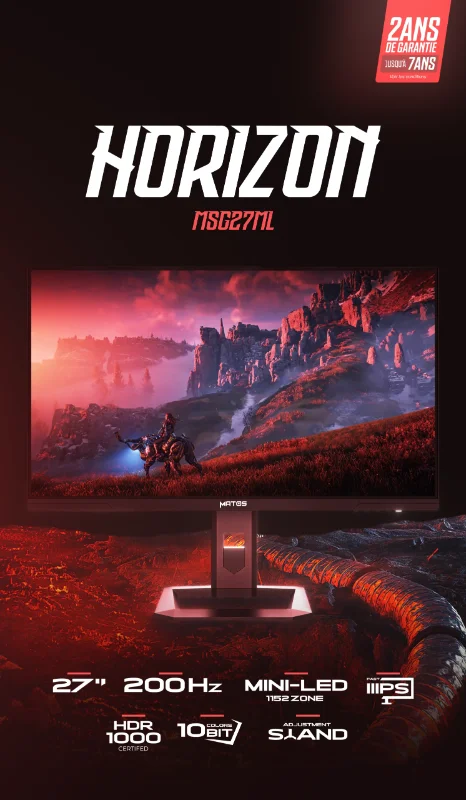
The Matos Horizon 27-inch Mini-Led lists a 27-inch Fast IPS panel, 2560 × 1440 and 200 Hz. Its description specifies a backlight with 1,152 local dimming zones. This makes its HDR capabilities worth investigating, but does not establish actual dimming quality, blooming or sustained brightness.
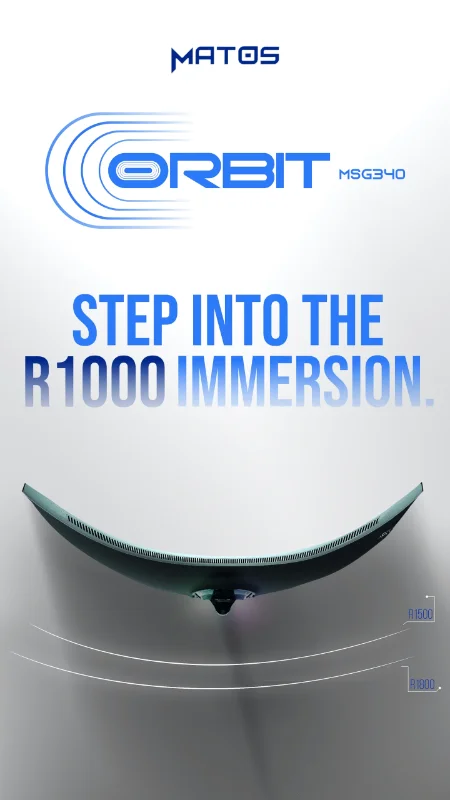
The Matos Orbit MSG340 34-inch lists a 34-inch curved VA panel, 3440 × 1440 and 165 Hz. Here, it is the option to investigate for wider views in supported games and side-by-side windows. Check ultrawide support in your games rather than assuming every title will fill the screen correctly.
Read the comparison without inventing a ranking
The automatic comparison must retrieve values and prices from the catalogue. The selected fields correspond to characteristics present in the public descriptions; their actual population in the comparison component still needs checking in preview. A missing cell does not mean zero or an absent feature.
Published formats and specifications
Start with resolution and format. A higher refresh rate does not automatically identify the best monitor for your use.
RTINGS explains gaming monitor selection by distinguishing motion, responsiveness and picture quality. Its response-time methodology also examines overshoot: a pixel can change quickly while producing inverse ghosting.
““Two monitors can have the same refresh rate that have different response times and different motion handling.””
In other words, an identical refresh rate does not mean identical motion clarity. The DARKNESS and Orbit’s advertised 1 ms MPRT figures cannot be directly ranked against the Horizon’s advertised 0.5 ms GTG: these are different metrics, not independent latency measurements in this article.
Start with your games and PC capabilities
Competitive play and smoothness
If competitive titles dominate your time, observe FPS and stability at the settings you actually use. The DARKNESS keeps you at Full HD; the Horizon adds a higher resolution and a higher advertised maximum refresh rate, without guaranteeing that your PC can exploit it or that its pixel transitions are better.
Detail and mixed use
For gaming, reading and work, the Horizon offers more pixels on the same 27-inch diagonal as the DARKNESS. This provides a finer display grid at a comparable size; still check readability with your chosen scaling and viewing distance.
Immersion and multiple windows
The Orbit provides an ultrawide canvas for supported games and arranging several documents. Its format requires checking desk space, comfort when reading at the sides and the behaviour of games that enforce a 16:9 picture.
At comparable settings, increasing resolution increases the number of pixels to render; it does not predict a precise FPS result. Look for tests of your graphics card in your games at the target resolutions. Separate native rendering results from upscaling or frame generation, and examine slowdowns as well as averages.
Check the desk, connections and everyday use
Measure free desk width and depth while leaving space for the keyboard, mouse and your arms. Ask for assembled monitor dimensions with the stand: packaging dimensions do not answer this question. Diagonal size alone describes neither the footprint nor a comfortable viewing distance. The Orbit particularly warrants checking available width.
The Horizon listing advertises height adjustment and VESA 100 × 100 mounting; the Orbit listing advertises an adjustable stand and VESA 75 × 75. The accessible DARKNESS information does not adequately confirm these capabilities, so ask for clarification. A monitor arm also needs a suitable weight rating and clearance for the exact model.
Editorial buying checklist, not a product configuration
- Games and applications
- titles used, ultrawide support and reading requirements.
- PC
- graphics card, observed performance and target resolution.
- Desk
- measured space and assembled dimensions with the stand to confirm.
- Connection
- compatible video output, monitor input, cable and resolution/refresh mode.
- Ergonomics
- height, tilt, viewing distance and any compatible arm to check.
- Budget
- total in dinars including genuinely necessary accessories.
The Horizon lists HDMI 2.1 and DisplayPort 1.4; the Orbit lists HDMI 2.0 and DisplayPort 1.4. Those names alone do not certify every combination of refresh rate, resolution, colour depth and VRR. Ask which modes each input supports and check your PC’s output too, particularly with a laptop or docking station.
Understand the choice, then check the settings
The RTINGS video below explains in English how to separate motion, responsiveness and picture quality. It provides a general selection method, not testing of these three Matos monitors. The essential points are also covered in the article so the advice does not depend on its language or subtitles.
After installation, select native resolution and your intended refresh rate in the operating system, then check variable refresh operation with your graphics card and chosen connection. Try your games and text at your usual viewing distance. Correct software configuration is necessary, but does not replace response-time, colour or HDR measurements.
Evaluate the versatile QHD choice
The following strengths and limitations concern choosing the Horizon for mixed use, based on its listing, rather than a laboratory verdict.
Horizon: reasons to consider it
- QHD on 27 inches for a finer image than Full HD at the same diagonal.
- Advertised 200 Hz operation for a PC capable of benefiting from it.
- Advertised adjustable stand and local dimming to investigate for your needs.
Horizon: limitations to accept or check
- QHD requires more graphics work than Full HD at comparable settings.
- The listing alone proves neither HDR quality nor motion clarity.
- Stand footprint, input-specific modes and availability still need confirmation.
A conditional choice, not a universal winner
Put your actual use first
Consider the Horizon if you want gaming and work on 27 inches, your PC is suitable for QHD and the complete cost is acceptable. Investigate the DARKNESS instead if staying at Full HD is your priority; investigate the Orbit if width is essential, your games support it and your desk accommodates it. Before ordering, confirm the model, stock, connections and sales terms. Without comparable testing, none of the three is declared superior in responsiveness or HDR quality.